How to Choose the Best RDP Provider in 2026 (Complete Buyer’s Guide)
Introduction
Remote Desktop Protocol (RDP) has become an essential solution for businesses, freelancers, developers, traders, gamers, and remote employees who need secure access to Windows desktops from anywhere in the world. As remote work continues to grow and cloud computing becomes more common, choosing the right RDP provider is more important than ever.
However, with hundreds of providers claiming to offer the fastest speeds, lowest prices, and best security, selecting the right service can be confusing. Some providers advertise unlimited resources but fail to deliver stable performance, while others compromise on security or customer support.
Choosing the wrong RDP provider can lead to slow performance, frequent downtime, security vulnerabilities, hidden costs, and poor customer experience. That’s why understanding what to look for before purchasing an RDP plan is essential.
This guide explains everything you need to know about choosing the best RDP provider in 2026. Whether you’re buying your first Windows RDP or switching from another provider, this article will help you make an informed decision.
What Is an RDP Provider?
An RDP provider is a company that rents remote Windows desktops or servers that users can access through Microsoft’s Remote Desktop Protocol.
Instead of running demanding software on your local computer, an RDP allows you to connect to a powerful remote machine over the internet. The remote desktop functions like a regular Windows PC but is hosted in a professional data center.
Most RDP providers offer different plans based on:
- CPU cores
- RAM
- SSD or NVMe storage
- Windows operating system
- Dedicated or shared resources
- Bandwidth
- Geographic server locations
Users simply log in using Remote Desktop Connection (RDC) on Windows or compatible RDP clients on macOS, Linux, Android, or iPhone.
Why Choosing the Right RDP Provider Matters
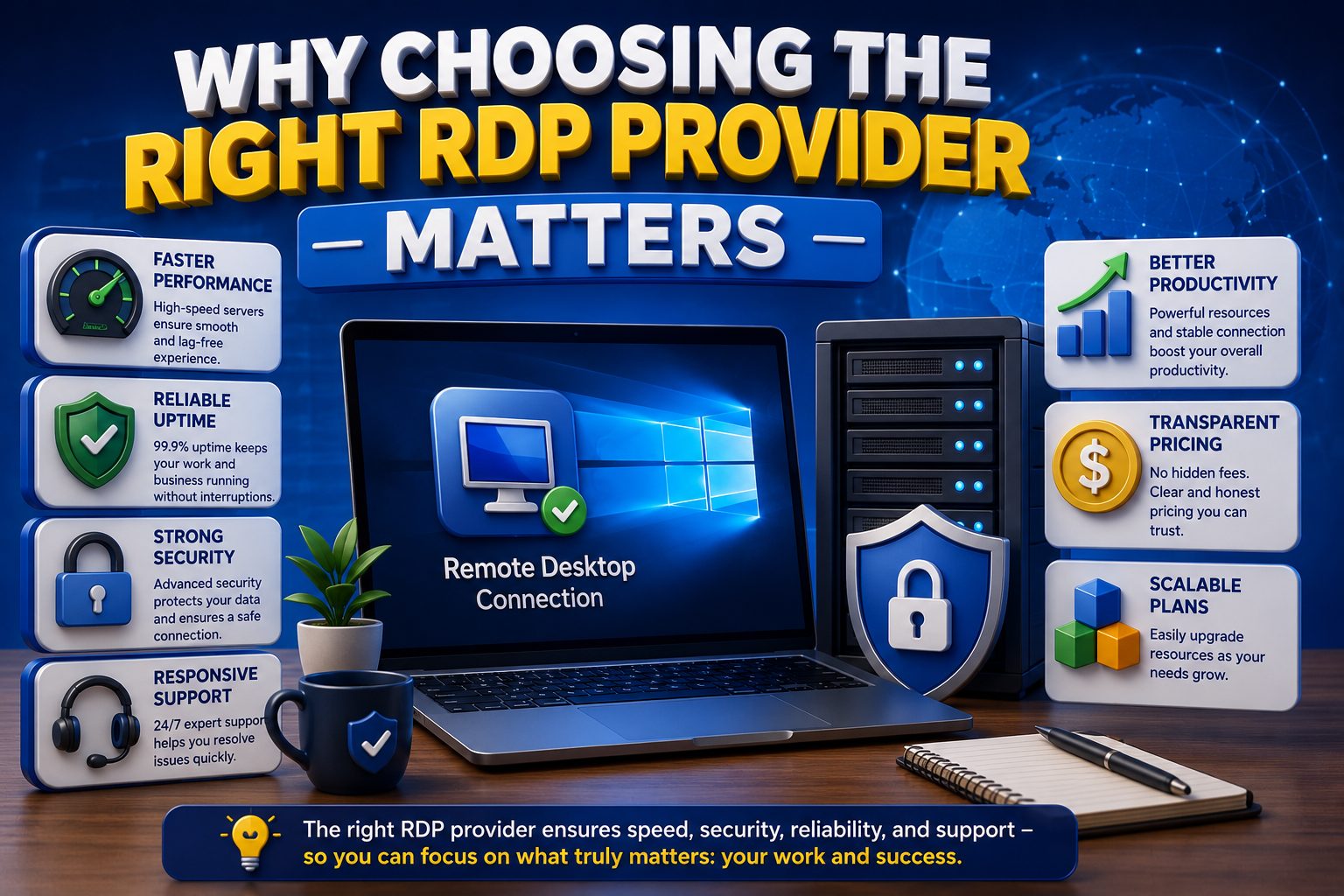
Many buyers only compare prices, but price alone doesn’t determine the quality of an RDP service.
A reliable provider offers:
- Fast server performance
- Stable uptime
- Strong security
- Responsive technical support
- High-speed network connectivity
- Transparent pricing
- Regular backups
- Scalable plans
A poor provider may result in:
- Slow desktop performance
- Frequent disconnections
- Data loss
- Malware infections
- Delayed customer support
- Unexpected renewal costs
Your productivity depends heavily on the quality of the RDP service you choose.
Who Should Use an RDP?
RDP services are useful for a wide range of users.
Businesses
Companies use RDP for remote employees, centralized management, secure file access, and software deployment.
Freelancers
Designers, developers, marketers, and consultants can access work files from anywhere.
Software Developers
Developers use Windows RDP to test applications, host development environments, and manage servers.
Forex and Stock Traders
Many traders run trading platforms on low-latency RDP servers to maintain continuous connectivity.
Digital Agencies
Marketing agencies use RDP for SEO tools, automation software, and client management.
Students
Students can use affordable RDP plans for programming, software learning, and remote lab access.
Key Factors to Consider Before Choosing an RDP Provider
1. Server Performance
Performance should be your first priority.
A powerful RDP should provide:
- Latest Intel Xeon or AMD EPYC processors
- High clock speeds
- Sufficient RAM
- Fast NVMe SSD storage
- Low disk latency
Performance directly affects application loading time, multitasking, and overall responsiveness.If your work involves video editing, software development, or multiple applications running simultaneously, investing in higher hardware specifications is worthwhile.
2. SSD vs NVMe Storage
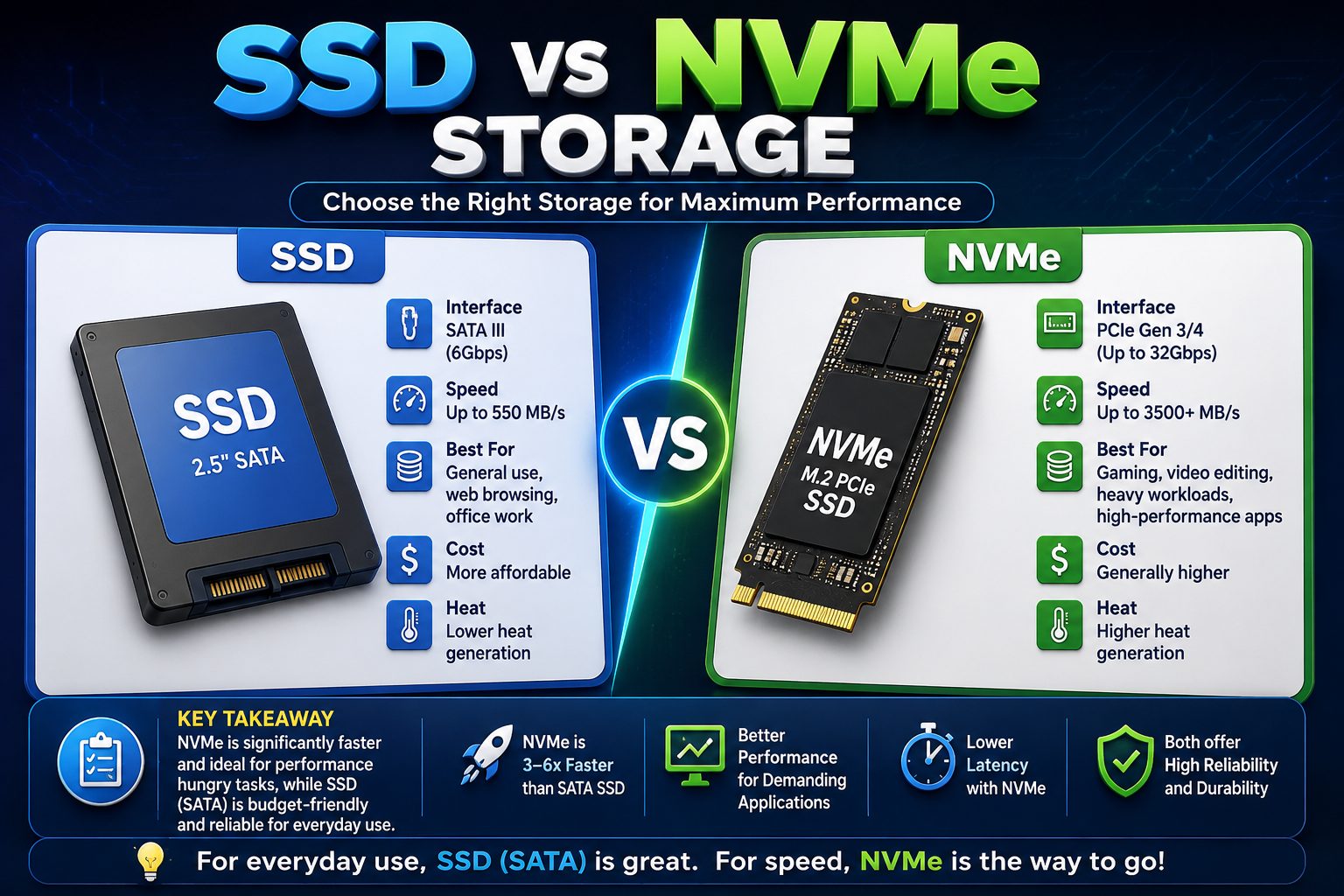
Storage technology significantly impacts speed.
SSD Storage
- Faster than traditional HDDs
- Good for everyday workloads
- Lower cost
NVMe SSD
- Much faster read/write speeds
- Better multitasking
- Faster Windows boot times
- Improved database performance
In 2026, NVMe storage has become the preferred option for most professional RDP users.
3. Dedicated vs Shared Resources
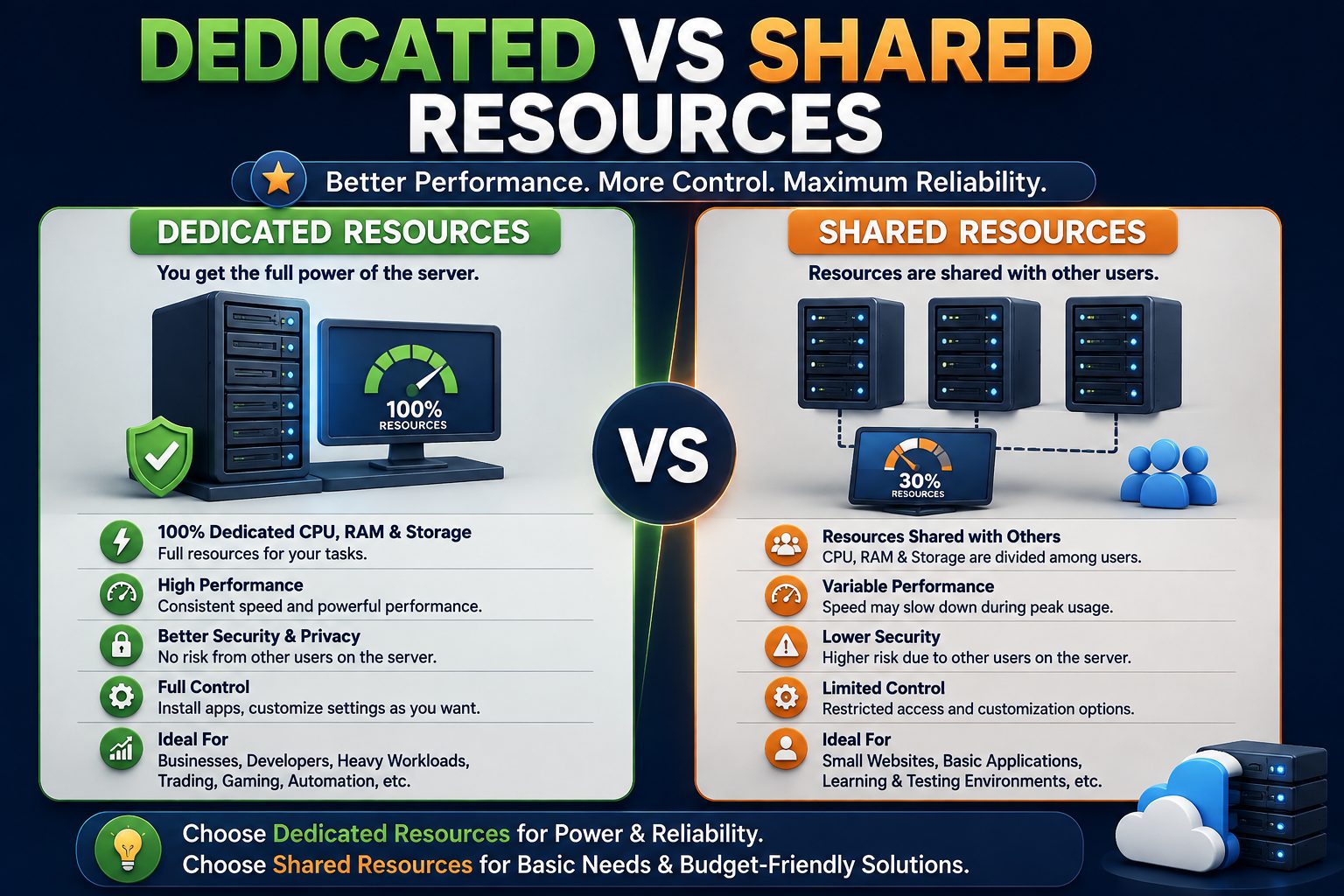
Understanding the difference is essential.
Shared RDP
Resources are shared among multiple users.
Pros:
- Lower cost
- Suitable for beginners
- Easy to manage
Cons:
- Performance may fluctuate
- Limited customization
Dedicated RDP
Resources belong entirely to one customer.
Pros:
- Better speed
- Consistent performance
- Higher security
- Greater control
Cons:
- Higher monthly cost
If your business depends on reliability, dedicated RDP is usually the better investment.
4. Server Location
The physical location of the server affects latency.
Choose a provider with data centers close to your target users.
Common locations include:
- United States
- Canada
- United Kingdom
- Germany
- France
- Netherlands
- Singapore
- India
- Australia
A nearby server generally offers lower latency and a smoother remote desktop experience.
5. Network Speed and Bandwidth
Network quality often matters more than hardware.
Look for providers offering:
- 1 Gbps or higher ports
- Premium bandwidth
- Low latency
- Reliable routing
- High-speed connectivity
Unlimited or generous bandwidth is beneficial if you regularly transfer large files.
6. Uptime Guarantee
Downtime can interrupt important work and reduce productivity.
A reputable provider should offer:
- 99.9% uptime or higher
- Redundant network infrastructure
- Backup power systems
- Enterprise-grade data centers
- Continuous monitoring
Consistent uptime ensures your RDP remains available whenever you need it.
7. Security Features
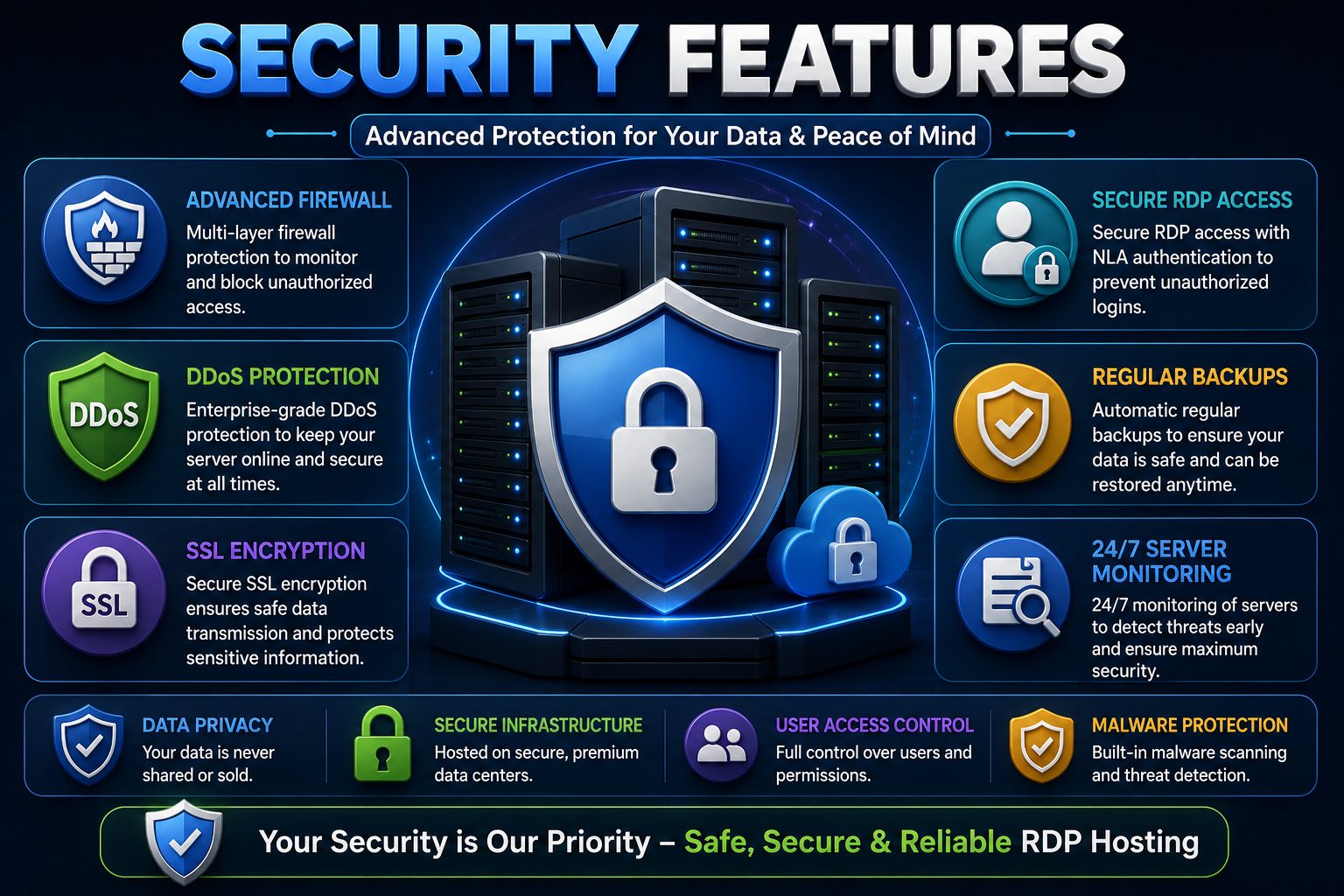
Cybersecurity should never be overlooked.
A trustworthy RDP provider should include:
- Strong firewall protection
- DDoS protection
- Secure login authentication
- Regular security updates
- Malware protection
- Data encryption
- Account monitoring
If available, enable multi-factor authentication (MFA) to add another layer of protection.
8. Windows Licensing
Always verify that Windows licenses are genuine.
Licensed operating systems provide:
- Regular Microsoft updates
- Better security
- Improved stability
- Compliance with licensing requirements
Avoid providers that cannot clearly explain their Windows licensing.
9. Technical Support
Even experienced users occasionally need assistance.
Look for providers offering:
- 24/7 customer support
- Live chat
- Ticket system
- Email support
- Knowledge base
- Fast response times
Before purchasing, consider reading customer reviews to understand how quickly support issues are resolved.
10. Pricing Transparency
The cheapest plan isn’t always the best value.
Compare:
- Monthly price
- Renewal cost
- Setup fee
- Upgrade charges
- Backup fees
- Additional IP costs
A trustworthy provider clearly explains all pricing without hidden charges.
Questions to Ask Before Buying an RDP
Before placing your order, ask yourself these questions:
- What applications will I run?
- How much RAM do I actually need?
- Do I need a dedicated or shared environment?
- Which server location is closest to me?
- How important is 24/7 support?
- Is data security a top priority?
- Can the plan be upgraded later?
- Are backups included?
- Does the provider have positive customer reviews?
- What is the refund policy?
Answering these questions will help you choose a service that matches both your technical requirements and your budget.
Common Mistakes to Avoid
Many buyers make avoidable mistakes when selecting an RDP provider.
Some of the most common include:
- Choosing solely based on the lowest price.
- Ignoring uptime guarantees.
- Overlooking server location and latency.
- Buying more resources than necessary.
- Not checking customer support quality.
- Failing to verify Windows licensing.
- Ignoring security features.
- Skipping customer reviews.
- Forgetting to compare renewal pricing.
- Choosing a provider without a clear upgrade path.
Avoiding these mistakes can save both time and money in the long run.
How to Compare Different RDP Providers
Once you’ve shortlisted a few RDP providers, it’s time to compare them side by side. A structured comparison helps you identify which provider offers the best balance of performance, reliability, security, and value for money.
Compare Hardware Specifications
Hardware is the backbone of any RDP service. Look beyond marketing terms like “high performance” and check the actual specifications.
Compare factors such as:
- CPU model and number of cores
- RAM capacity
- SSD or NVMe storage
- Storage size
- Network speed
- Operating system version
For example, an RDP with NVMe storage and modern Intel Xeon or AMD EPYC processors will usually outperform older hardware with standard SSDs.
Evaluate Performance
Performance cannot always be judged by specifications alone.
Before purchasing, check whether the provider offers:
- Trial plans
- Demo access
- Money-back guarantee
- Customer benchmarks
- Independent reviews
These resources can help you understand how the server performs under real-world workloads.
Review Security Standards
Security is one of the most important aspects of any remote desktop service.
A quality provider should regularly update Windows, patch vulnerabilities, monitor suspicious activity, and protect customer data with modern security practices.
Check whether the provider offers:
- DDoS protection
- Firewall management
- Malware scanning
- Secure remote access
- Backup options
- Data encryption
Read Customer Reviews
Customer reviews often reveal details that providers don’t mention on their websites.
Pay attention to comments about:
- Server stability
- Support quality
- Billing transparency
- Downtime
- Renewal experience
- Overall customer satisfaction
Look for consistent feedback rather than relying on a single positive or negative review.
Compare Upgrade Flexibility
Your needs may change over time.
Choose a provider that allows you to upgrade your plan without significant downtime.
Flexible upgrades make it easier to add:
- More CPU cores
- Additional RAM
- Extra storage
- Higher bandwidth
- Multiple IP addresses
Scalable services help businesses grow without migrating to another provider.
Essential Features Checklist
Before purchasing any Windows RDP, verify that it includes most of the following features.
Performance
- Modern Intel Xeon or AMD EPYC processors
- NVMe SSD storage
- Sufficient RAM
- Fast network connectivity
Security
- Firewall protection
- DDoS mitigation
- Secure Windows updates
- Data encryption
- Regular security monitoring
Reliability
- 99.9% uptime guarantee
- Enterprise-grade data centers
- Redundant infrastructure
- Stable network routing
Customer Support
- 24/7 technical support
- Live chat
- Ticket system
- Email support
- Helpful knowledge base
Flexibility
- Easy upgrades
- Multiple server locations
- Monthly billing options
- Backup services
- Transparent pricing
Using this checklist can simplify your decision-making process and reduce the risk of choosing the wrong provider.
Red Flags to Avoid
Not every RDP provider delivers what they promise. Watch out for these warning signs before making a purchase.
Unrealistically Low Prices
If a plan seems much cheaper than competitors, ask yourself why.
Very low prices often mean:
- Oversold servers
- Poor hardware
- Limited support
- Hidden charges
- Unstable performance
A slightly higher monthly fee is often worth paying for better reliability.
No Uptime Commitment
A provider that doesn’t clearly mention uptime guarantees may not prioritize service reliability.
Always look for providers that publicly state their uptime commitment.
Limited Customer Support
Technical issues can happen at any time.
If a provider only offers limited support hours or takes days to respond, resolving urgent problems may become frustrating.
Hidden Fees
Read the pricing page carefully.
Some providers charge extra for:
- Windows licensing
- Additional IP addresses
- Backups
- Setup fees
- Plan upgrades
- Reinstallation
Transparent pricing is a sign of a trustworthy company.
Outdated Hardware
Older processors and HDD storage can significantly reduce performance.
Choose providers that regularly upgrade their infrastructure and clearly mention the hardware they use.
Poor Website Information
A professional provider should clearly explain:
- Hardware specifications
- Data center locations
- Security features
- Support channels
- Service policies
If important information is missing, consider it a warning sign.
Best RDP Use Cases in 2026
Remote Desktop services are more versatile than ever. Here are some of the most common use cases in 2026.
Remote Work
Employees can securely access office computers, applications, and files from anywhere, improving flexibility and productivity.
Software Development
Developers use Windows RDP for coding, testing applications, hosting development environments, and managing remote servers.
Business Operations
Companies centralize software, documents, and business applications while reducing dependence on physical office systems.
Digital Marketing
SEO professionals, advertisers, and marketing agencies often use RDP to manage campaigns, analytics tools, and multiple client projects.
Forex and Stock Trading
Many traders rely on low-latency RDP servers to run trading platforms continuously with stable internet connectivity.
Graphic Design
Designers working with moderate creative workloads can use powerful RDP environments to collaborate remotely and access project files.
Education and Online Learning
Students and educators use remote desktops to access licensed software, programming tools, and virtual computer labs without requiring high-end personal hardware.
Frequently Asked Questions (FAQs)
What is the best RDP provider in 2026?
The best provider depends on your requirements. Focus on performance, security, uptime, customer support, transparent pricing, and scalability rather than choosing solely based on price.
Should I choose shared or dedicated RDP?
Shared RDP is suitable for light workloads and beginners, while dedicated RDP offers better performance, stronger isolation, and greater reliability for business or resource-intensive applications.
Is NVMe storage better than SSD?
Yes. NVMe storage delivers significantly faster read and write speeds, quicker application loading, and better multitasking compared to traditional SATA SSDs.
How much RAM do I need?
For basic office tasks, 4 GB RAM may be sufficient. For development, multitasking, or business applications, 8 GB to 16 GB RAM is generally recommended.
Does server location matter?
Absolutely. Selecting a server close to your location or your target audience reduces latency and improves responsiveness.
Is Windows licensing important?
Yes. A properly licensed Windows installation ensures access to official updates, security patches, and better long-term stability.
Can I upgrade my RDP later?
Most reputable providers allow seamless upgrades to CPU, RAM, storage, and bandwidth as your requirements grow.
# Quick RDP Buying Checklist
Before purchasing an RDP plan, make sure you have verified the following:
– ✔️ Latest Intel Xeon or AMD EPYC processor
– ✔️ NVMe SSD storage
– ✔️ Enough RAM for your workload
– ✔️ 99.9% uptime guarantee
– ✔️ DDoS and firewall protection
– ✔️ Genuine Windows license
– ✔️ 24/7 customer support
– ✔️ Transparent pricing
– ✔️ Multiple data center locations
– ✔️ Easy upgrade options
SEO Meta Title
How to Choose the Best RDP Provider in 2026 | Complete Buyer’s Guide
Length: ~60 characters
SEO Meta Description
Learn how to choose the best RDP provider in 2026. Compare performance, security, pricing, uptime, support, and essential features before buying Windows RDP services.
Length: ~155 characters
Recommended URL Slug
how-to-choose-the-best-rdp-provider-in-2026
Suggested Primary Keyword
Best RDP Provider in 2026
Secondary Keywords
- Windows RDP Provider
- Buy Windows RDP
- Dedicated RDP
- Shared RDP
- Secure RDP Hosting
- Remote Desktop Provider
- Windows Remote Desktop
- Best RDP Hosting
- RDP Server
- Managed RDP Services
Internal Linking Ideas
To improve SEO and user engagement, consider linking this article to related content such as:
- Windows RDP vs VPS: Which One Should You Choose?
- How to Secure Your Windows RDP Server
- Dedicated RDP vs Shared RDP
- Common RDP Errors and Their Solutions
- Benefits of Using Windows RDP for Businesses
Image Alt Text Suggestions
- Best Windows RDP Provider Comparison
- Choosing the Right RDP Provider
- Windows RDP Hosting Features
- Secure Remote Desktop Services
- High-Performance Windows RDP Server
Conclusion
Choosing the best RDP provider in 2026 requires more than simply comparing prices. A reliable provider should offer powerful hardware, fast NVMe storage, strong security, consistent uptime, responsive customer support, and flexible upgrade options to meet your growing needs.
Before making your decision, carefully evaluate server performance, data center locations, security features, pricing transparency, and customer reviews. Taking the time to compare providers can help you avoid common issues such as poor performance, hidden fees, and unreliable support.
Whether you’re a business owner, freelancer, developer, trader, or remote professional, selecting the right Windows RDP service can improve productivity, enhance security, and provide seamless remote access from anywhere. By following the tips and best practices shared in this guide, you’ll be well-equipped to choose an RDP provider that delivers long-term reliability, excellent performance, and outstanding value.